The Digital Hoarding Problem: When Your Desktop Needs an Intervention
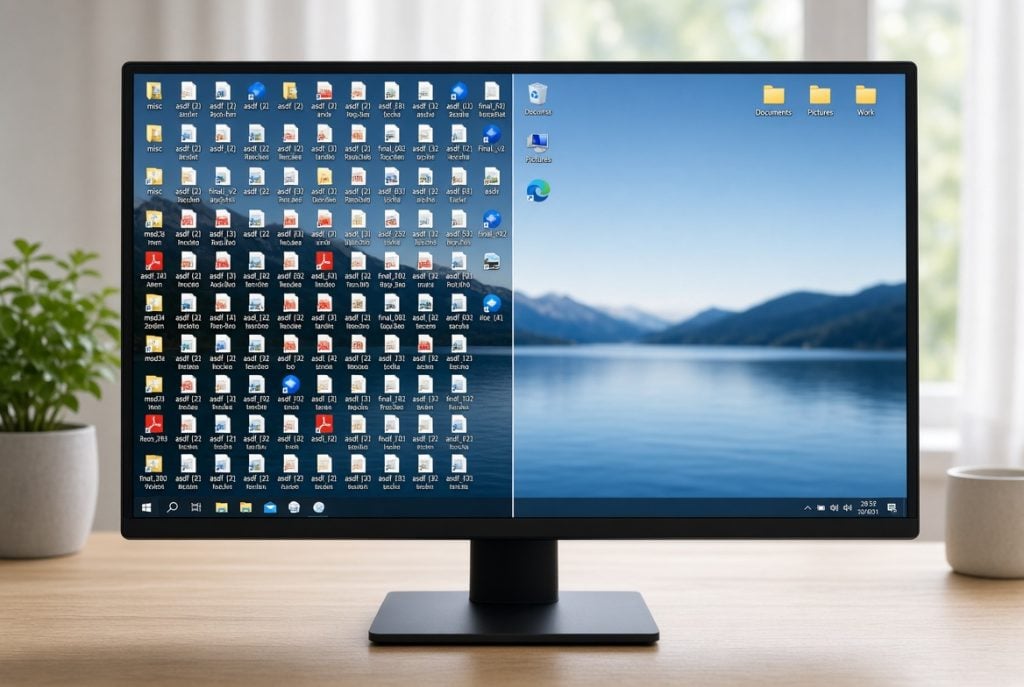
We’ve all seen it. A client sits down, opens their laptop, and there it is: a desktop so covered in icons you can’t even see the wallpaper anymore. Screenshots named “Screenshot 2019,” files just called “asdf,” seventeen versions of the same resume, and a folder labeled “misc” that’s somehow 40GB.
No judgment here. Truly. We see this constantly, and honestly, it’s a completely human thing to do. But just like a cluttered closet, a cluttered computer isn’t just an eyesore — it can genuinely slow you down, in more ways than one.
Why it happens
It’s rarely laziness. Usually it’s the opposite — you were busy, something needed saving right now, and the desktop was the fastest place to put it. Multiply that by a few years, and suddenly you’re living with a few thousand digital houseguests who never left.
Why it’s worth fixing (not just for the aesthetics)
It can actually slow your computer down. Every icon on your desktop is a little more for your system to render and keep track of every time you boot up or refresh. A wildly cluttered desktop, especially one full of large files or on an older hard drive, can be a real (if usually small) drag on responsiveness. Full drives (especially SSDs that are nearly full) can also hurt performance and make backups harder.
It makes backups harder and riskier. If you don’t know what’s actually on your machine, it’s hard to know what’s actually protected. We can’t tell you how many times we’ve recovered a computer only to find the one irreplaceable file — old family photos, a scanned document, a half-finished project, or even something like a will or estate document — buried three folders deep with a name like “final_FINAL_v2.” And if something ever happened to you, would a loved one even be able to find that file in the chaos?
It makes real problems harder to spot. A rogue file, a weird download, or an actual sign of malware is a lot easier to notice on an organized system than in a haystack of a few thousand unsorted icons.
It’s a genuine source of stress. This one’s real, and it’s not just us being dramatic — plenty of research backs up that visual clutter, digital or physical, adds a low hum of background stress even when you’re not consciously thinking about it.
The gentle intervention (no shame required)
You don’t need to do this all in one exhausting weekend. Here’s how we’d approach it if it were our own machine:
✅ Start with a “keep, sort, toss” triage. Anything you haven’t touched in over a year and can’t identify at a glance? It’s probably safe to move to an “Old Stuff — Review Later” folder rather than deleting it outright. Removes it from view without the pressure of a permanent decision.
✅ Use the folders Windows already gave you. Documents, Pictures, and Downloads are already sitting right there in File Explorer — most people just never use them. Get in the habit of saving into those instead of the desktop (a single “Work/Projects” folder of your own is fine to add on top). You don’t need a fancier system than that — the real win is just keeping the desktop itself clear.
✅ Let your search bar do the work. Modern search in Windows is genuinely good these days—especially when indexing is healthy, which is another quiet benefit of a cleaner system. You don’t need a perfect folder structure if you can find things by typing a keyword.
✅ Back it up before you touch anything. A real backup is a second copy of your files living somewhere other than the computer itself — an external drive or a cloud service. Make sure everything’s backed up that way before any big cleanup, so “sorting” never accidentally turns into “losing.”
✅ Set a recurring 15-minute tidy. Once a month, drag anything new off the desktop into its home. Small and often beats big and rare, every time.
When to call in the pros
If your desktop clutter comes with a computer that’s also running slow or taking forever to boot, that’s exactly what a tune-up is for — we’ll dig into the performance side of things and get it running the way it should.
As for the clutter itself: if you bring your own backup media (an external drive or similar), we’ll make sure everything on the computer is safely backed up before we touch anything. From there, the actual sorting and deleting is up to you — we don’t go through or reorganize client files — but with a backup in place, you can clean things up on your own time without worrying about losing anything important.
Your computer doesn’t need to be a museum of everything you’ve ever downloaded. Let’s give it (and you) a little breathing room. Call or text us at (612) 234-7237, or reach out here to get started.

Psinergy Tech (Computer Repair) – find us under the Gold Sign!
Featured by Psinergy
-
%22%20transform%3D%22translate(.5%20.5)%22%20fill-opacity%3D%22.5%22%3E%3Cellipse%20fill%3D%22%23879929%22%20rx%3D%221%22%20ry%3D%221%22%20transform%3D%22matrix(.28697%20-20.01666%20148.98469%202.13594%2049.6%2036.1)%22%2F%3E%3Cellipse%20fill%3D%22%23000006%22%20rx%3D%221%22%20ry%3D%221%22%20transform%3D%22matrix(1.5182%2017.00115%20-148.40943%2013.25293%2069.8%20141.6)%22%2F%3E%3Cellipse%20fill%3D%22%233c3b41%22%20cx%3D%2274%22%20cy%3D%2275%22%20rx%3D%2237%22%20ry%3D%2237%22%2F%3E%3Cpath%20fill%3D%22%2304020f%22%20d%3D%22M6.7%20156.7L-25%20129.2l24.3-28L31%20128.9z%22%2F%3E%3Cpath%20fill%3D%22%2386933e%22%20d%3D%22M115%2031h35v33h-35z%22%2F%3E%3Cellipse%20cx%3D%22134%22%20cy%3D%22149%22%20rx%3D%2231%22%20ry%3D%2214%22%2F%3E%3Cellipse%20fill%3D%22%23413f4b%22%20rx%3D%221%22%20ry%3D%221%22%20transform%3D%22matrix(4.84214%20-34.37254%2078.60353%2011.07307%2063.5%2093.1)%22%2F%3E%3Cpath%20fill%3D%22%238c9751%22%20d%3D%22M0%2025h69v15H0z%22%2F%3E%3Cpath%20fill%3D%22%2300000d%22%20d%3D%22M112%200h38v8h-38z%22%2F%3E%3Cpath%20fill%3D%22%2300000f%22%20d%3D%22M32.5-8V8h-37V-8z%22%2F%3E%3Cellipse%20fill%3D%22%23424f02%22%20cx%3D%2277%22%20cy%3D%2249%22%20rx%3D%2236%22%20ry%3D%227%22%2F%3E%3Cpath%20fill%3D%22%235e6a1e%22%20d%3D%22M70%2015L59%2054l89-39z%22%2F%3E%3Cpath%20fill%3D%22%23747e3e%22%20d%3D%22M0%2036l19%2018-35%2050z%22%2F%3E%3Cpath%20fill%3D%22%23767776%22%20d%3D%22M47.4%2091.2l8-.4%201.2%2024-8%20.4z%22%2F%3E%3Cellipse%20fill%3D%22%234f5a16%22%20rx%3D%221%22%20ry%3D%221%22%20transform%3D%22rotate(-174.2%202.9%2013)%20scale(21.02694%205.54702)%22%2F%3E%3Cpath%20fill%3D%22%23869052%22%20d%3D%22M126.7%2022.4l15.7%2019.4-17%2013.8-15.8-19.4z%22%2F%3E%3Cpath%20d%3D%22M119%20136h31v14h-31z%22%2F%3E%3Cpath%20fill%3D%22%235b6818%22%20d%3D%22M103%2048h47v16h-47z%22%2F%3E%3Cellipse%20fill%3D%22%233d3a4c%22%20cx%3D%2270%22%20rx%3D%2241%22%20ry%3D%2216%22%2F%3E%3Cpath%20fill%3D%22%233e3d45%22%20d%3D%22M101.5%2064h79v54h-79z%22%2F%3E%3C%2Fg%3E%3C%2Fsvg%3E) Virus Removal Services (PC-Windows)
Price range: $171.99 through $351.00
Virus Removal Services (PC-Windows)
Price range: $171.99 through $351.00

:: Recommended Businesses ::